Notice: 函数 _load_textdomain_just_in_time 的调用方法不正确storeys 域的翻译加载触发过早。这通常表示插件或主题中的某些代码运行过早。翻译应在 init 操作或之后加载。 请查阅调试 WordPress来获取更多信息。 (这个消息是在 6.7.0 版本添加的。) in /home/wwwroot/ixiaotu.com/wp-includes/functions.php on line 6061
xSearch for Safari 1.8.4 for Mac版下载 | 快速切换搜索引擎(Safari扩展插件) - 小兔网
Warning: Undefined variable $pop_ad_style in /home/wwwroot/ixiaotu.com/wp-content/plugins/pop-ad/pop_ad.php on line 75

xSearch for Safari 1.8.4 for Mac版下载 | 快速切换搜索引擎(Safari扩展插件)

xSearch for Safari 1.8.4 for Mac|Mac版下载 | 快速切换搜索引擎(Safari扩展插件)

xSearch 是一个 Safari 浏览器的扩展,知识兔可以实现使用多个搜索引擎。在搜索文本前添加一个快捷键和一个空格,达到即时切换搜索引擎的功能。

例如: 使用 ”bing 苹果“ 在微软必应搜索引擎中搜索”苹果“, 而使用 “baidu 苹果“ 在百度搜索引擎中搜索”苹果“。

** 隐私政策 **

这是 macOS 在 Safari 扩展设置中对 xSearch 权限的描述:

鈥b€ “xSearch” 没有权限读取、修改或传输任何网页的内容。

这意味着我们不能访问任何网页的内容,因此您的隐私是完全受保护的。

** 功能 **

◆ 有了 xSearch,您可以在 Safari 应用程序中通过添加快捷方式即时切换您的搜索引擎,甚至可以用快捷方式在 Spotlight 中切换引擎,并自动跳转到 Safari 中搜索。

◆ URL Scheme:xSearch 不仅支持网站引擎,知识兔还支持URL Scheme,例如:在Safari(或Spotlight)中搜索 “jdapp 苹果” 会自动跳转到“京东”应用程序(如果知识兔您已经安装)并搜索”苹果“。

◆ 通过 iCloud 在您的所有设备上同步您的引擎。

◆ 通过 JSON 编辑引擎。

版本介绍

版本1.8.4说明:

– 错误修复及改进

资源截图
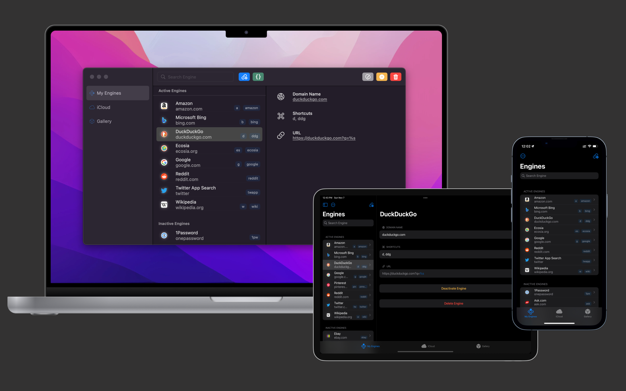
xSearch for Safari 1.8.4 for Mac|Mac版下载 | 快速切换搜索引擎(Safari扩展插件)

下载仅供下载体验和测试学习,不得商用和正当使用。

Restricted Content
To view this protected content, enter the password below:

点击下载

评论


Warning: error_log(/home/wwwroot/ixiaotu.com/wp-content/plugins/spider-analyser/#log/log-1009.txt): Failed to open stream: No such file or directory in /home/wwwroot/ixiaotu.com/wp-content/plugins/spider-analyser/spider.class.php on line 2966